Site speed optimisation
Finding what is actually slow and getting LCP, INP and CLS into the green — reported as a before and after number, not a Lighthouse screenshot.
What you get
- Baseline profile: LCP, INP, CLS, TTFB, transfer size and database query time
- Prioritised list of bottlenecks with the estimated impact of each
- The optimisations implemented on your site, not written up as advice
- Multi-layer caching configured: object cache, page cache, browser cache
- Final report with before and after numbers on the same pages under the same conditions
- A short maintenance note: what not to do so it does not get slow again
How it runs
- 1
Measure and diagnose
Before changing anything I record the current state from both field and lab data, and establish where the time actually goes: server, queries, JavaScript, or images.
- 2
Fix in order of impact
Biggest win first. Three or four changes usually produce eighty percent of the improvement; the rest rarely pays for itself.
- 3
Stabilise and hand over
Caching is configured so publishing content does not break it, everything is re-measured, and the before/after report includes the method used.
Speed is a chain, not a number
When someone says "the site is slow", they almost always mean one of four things, and each has a completely different fix:
- The server responds late (high TTFB) — PHP, database queries, or a missing object cache.
- The main content arrives late (high LCP) — usually an unoptimised image, a font without preload, or a JavaScript slider.
- The page responds late to clicks (high INP) — too much JavaScript on the main thread.
- Content jumps while loading (high CLS) — images without dimensions, injected banners, fonts without a matched fallback.
What usually happens is that a plugin gets installed for problem 1 which only slightly improves problem 2. That is why measurement comes first.
What actually gets measured
Lab data is good for diagnosis but it is not the verdict. The verdict is field data — what Google collects from your real visitors and uses in ranking. The report shows both.
| Metric | Green threshold | What it means |
|---|---|---|
| LCP | under 2.5s | When the visitor feels the page has arrived |
| INP | under 200ms | How long a click takes to respond |
| CLS | under 0.1 | How much content moves under the cursor |
| TTFB | under 800ms | How long the server takes to start |
What usually moves the needle
On WordPress sites these come up again and again:
meta_querywithout a supporting index onwp_postmeta. Across a few thousand products a two-condition filter can take seconds.- Plugins that load everywhere. A form builder injecting its CSS and JS into product pages.
- No object cache. Without Redis or Memcached, WordPress repeats dozens of
wp_optionsqueries on every request. - Remote fonts. Every font from another origin is a DNS lookup and a TLS handshake before a single letter is painted.
- Images without
widthandheight. The most common cause of CLS and the cheapest thing to fix.
Work in this area
 E-commerce2026
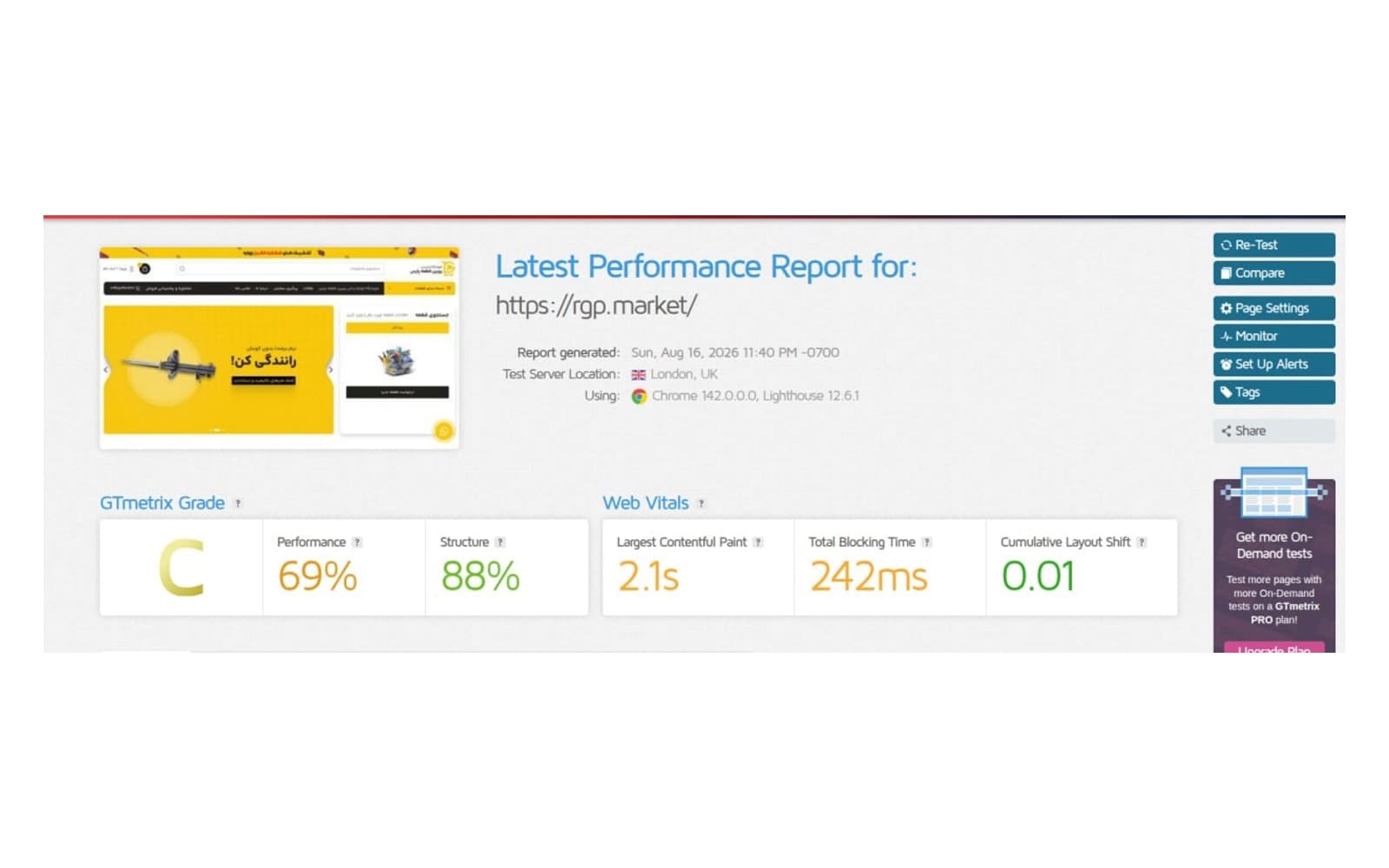
Measurable speed optimisation for RGP Market
In the initial GTmetrix test on July 4, 2026, the site scored 39% Performance and had a 10.5-second LCP. The goal was to improve loading experience without changing the store's visual identity or core features.
- GTmetrix Performance
- 3969(+77%)
Read the case study

Writing on this topic
- 2 min read
Reducing LCP in WordPress: the right order of work
Most speed guides hand you a list of twenty tasks without saying which ones matter. This one orders the work by impact-to-effort ratio.
- #performance
- #WordPress
- #Core Web Vitals
Frequently asked questions
How long does it take?
A typical business site is three to five working days. A WooCommerce store with several thousand products is one to two weeks, depending on the state of the database.
Can you guarantee a score of 100?
No, and anyone who does either has not seen your site or intends to game the lab number. What I guarantee is a transparent before and after; if there is no meaningful gain, I put the reason in writing.
Will the site go down while you work?
No. Work happens on a staging copy and only approved changes are applied to production.
How is this different from installing a cache plugin?
A cache plugin is one layer, and it does nothing at all for pages that cannot be cached — cart, checkout, account. The bulk of the work is reducing what the server and the browser have to do in the first place.
Related services
Not sure which one you need?
Just describe the problem. Working out which bucket it falls into is my job.